






Preces apraksts
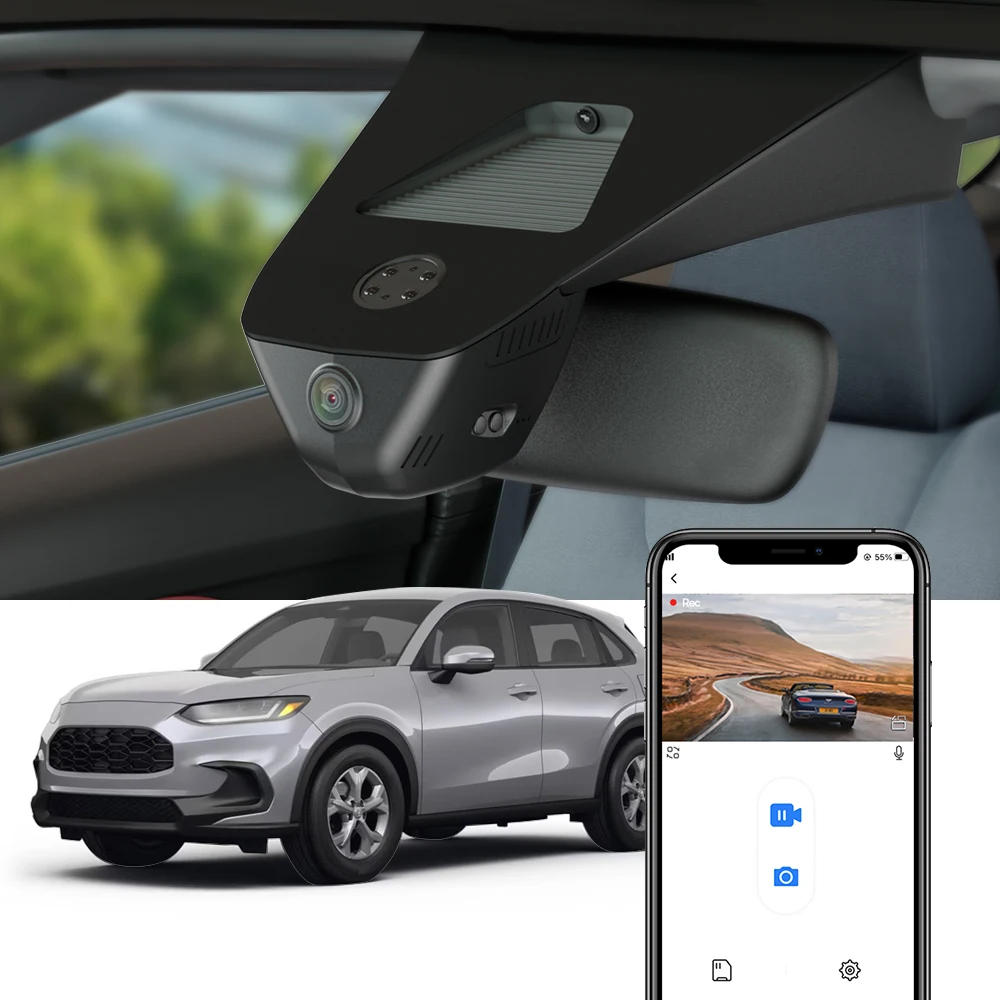
Suitable for the Following Models For Honda HR-V third Gen e:Ny1 2023 2024 2025 For Honda HR-V European version 2023 2024 For Honda ZR-V 2023 2024 * There are kinds of mannequin for this item, prefer the correct one per your car Plug and Play No harm to install, varied methods to take strength It takes strength from Overhead console panel The plug and play cable is shipped by way of default, if you want to switch the fuse field cable or OBD cable, please contact us earlier than sending Easy to Install Just remove the original again hide and replace it with FITCAMX dash cam and the set up of it's a breeze Perfect Fit 1:1 repair the shape of the unique automobile rearview replicate cover, low-key fashion style, completely fit your vehicle just like the original car accessories 4K UHD High Resolution UHD 4K Video Combined with improved Novatek chip + f/1 large aperture lens, Fitcamx sprint cam delivers clearer videos as much as 2160P resolution The CMOS sensor can enhance the image functionality in every aspect, re-appear more riding particulars Superior Night Vision Equipped with broad dynamic fluctuate technology, the video may be displayed within the splendid condition, each element of the video looks amazing This sprint cam can seize every vivid second obviously even at night, similar to license plates and street symptoms Loop Recording & G-Sensor Seamless loop recording will robotically overwrite the oldest footage with new content when memory card is full While G-Sensor can hit upon a sudden collision,save the relevant footage and lock it to file Keeping you away from disputes Comparison of Different Options 4K Front Only 2K Front and 1080P Rear 4K Front and 1080P Rear What&;s within the Box? 1× Dash Cam 1× Memory Card 1× Front Cam Cable 1× Removal Pry Tool 1× User Manual 1080P 360° Rotation Rear Camera (For "2K Dual Cam 64GB" & "4K Dual Cam 128GB", mounts at the rear windshield or going through the cabin) Q&A Problem 1: Apple iphone connection failed Solution: 1, flip off the Cellular Data of the telephone settings, and then connect to WiFi 2 If the telephone is connected to the car&;s CarPlay, you must flip off the Bluetooth, after which connect the camera WiFi three Check whether the album and network permissions of the App have been opened (*Album permission is just used to save lots of videos and photographs recorded by way of the digital camera into the telephone album) Problem 2: Android phone connection failure Solution: 1 connecting to the camera WiFi, your phone may prompt that you can&;t entry the Internet, please click on "Keep Wlan Connection" 2 Mobile Data first and then connect to WiFi Problem 3: App can not save settings (default settings are restored after reboot) Solution: After environment the App, please press and hold the power button of the digital camera to show off the camera, then press the power button quickly to show on the digital camera Problem 4: APP video file is empty, no video is loaded Solution: 1 open the App settings to format the memory card after which record the video 2 the App album still has no video, please insert the reminiscence card right into a computer, test whether the reminiscence card is damaged, or not well matched with the camera, if so it's best to replace the reminiscence card 3 is usually recommended to use Class10 specification SanDisk/KIOXIA/Samsung reminiscence cards of 32GB or 64GB skill (Maximum size supported is 256GB) Problem 5: Why doesn&;t my pc play the videos? Or why is the playback video now not smooth? Solution: 1 recommend the use of PotPlayer and KMplayer players 2 the computer configuration is too low, it could trigger the playback not to be smooth, especially for 4K decision movies Problem 6: Why can&;t you connect 2 phones on the same time? Solution: WiFi solely helps connecting one cellphone on the similar time; if another phone ought to be connected, you must first disconnect the WiFi of the first phone Problem 7: Why is the timestamp of the video wrong, or there's no recorded video during a while periods, or there is video when the phone is connected, but no video when the phone isn't connected? Solution: Please check if the timestamp error is brought on by an entire power failure of the digital camera After automobile repair, upkeep or battery replacement, it's best to reconnect the camera&;s WiFi along with your telephone to synchronize the camera&;s time with your phone&;s time Please regularly check that the digicam is operating wisely Problem 8: What must I do if I overlook the WiFi name or password? Solution: Press and keep the digital camera key for 20 seconds, or use a paperclip to press the reset button Problem 9: Do I should join the digital camera WiFi and open the App each time I drive? Solution: No need, the digital camera is robotically grew to become on and off The digital camera will mechanically switch on when the car is on and turn off when the automobile is off Problem 10: What must I do if I can&;t discover the WiFi? Solution: 1, eradicate the reminiscence card and then search for WiFi, as a result of reminiscence card failure will cause the digicam to don't have any WiFi 2 and hold the digital camera button for 20 seconds, or use a paper clip to press the reset button Restore factory settings three Check whether or not the camera&;s light is often on If there's no light, it means there is no energy supply, then there'll be no WiFi Warm and Important Tips About Products: It can be tremendous while you might tell us the model and year, plus we'd also like a photograph where we are able to see the entrance and side of the rear view mirror conceal The single front digital camera version is "4K Front Cam 64GB" The front and rear dual digicam versions are "2K Dual Cam 64GB" and "4K Dual Cam 128GB" All rear cameras in our store are 1080P decision All sprint cameras can use up to 256GB reminiscence card If you already have our unmarried entrance digicam version installed, you can not add our rear digicam If you purchase the entrance and rear twin digicam version, you would install the entrance camera and never the rear digital camera Each sprint digital camera is supplied with 1 cable to attach the front digital camera by means of default, additional cables cost between US$20 and US$35, in order for you them, please tell us All photographs are for reference only, assorted batches with different details, please discipline to genuine product About Taxes: The item payment is not including any taxes or costs locally, if the parcel get stuck at native customs, customer should touch the customs and do the customs clearance We won&;t undergo the customs taxes or any expenses caused by tradition or buyer reject package About After-sales: 1 shop gives a one-year product warranty If the product has quality issues inside one year, we will provide you with unfastened substitute elements If it is proven that it can't be repaired, we will update you with a new product at no cost 2 damage attributable to accident, misuse or modification, if alternative parts are required, the client is accountable for section charge and shipping 3 non-quality returns, when you prefer to get a full refund, you could possibly follow for a go back within 15 days of receiving the goods, and the customer is chargeable for the go back transport About Delivery: We will send the goods inside five working days once you have your price We don't assist editing the receipt news after payment, please verify the receipt information earlier than paying About Feedback: Five-Star suggestions is our expectation We hope which you could contact us before you leave a neutral or negative feedback, so that we are able to enable you to clear up the issue


Atsauksmes
0 people rated this product

Dash Camera for 2023 2024 2025 HR-V HRV 3rd Gen e:Ny Honda US/EU version / ZR-V ZRV, Fitcamx 4K Dash Cam for Honda Car Model


Bezmaksas piegāde un atgriešana
 QWQER Express,
 USPS,
USPS, DHL
DHL
Shopping security
- Safe payment options
- Secure privacy
- Secure logistics
- Purchase protection