





説明
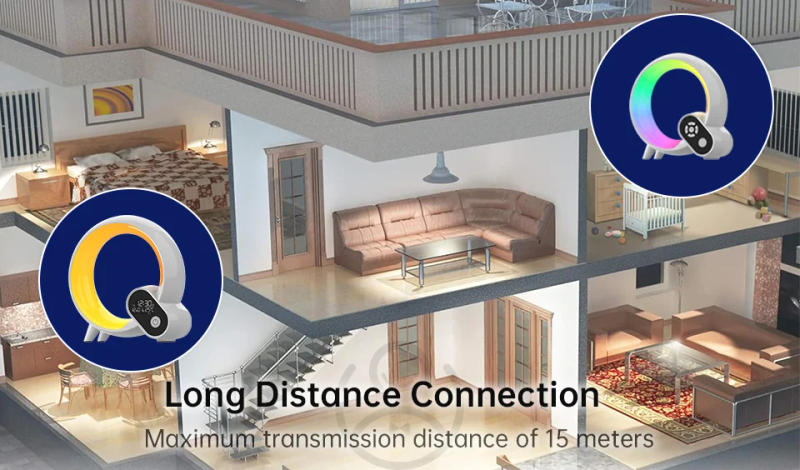
Packing list (Big Q) Smart Q Wake-up Light) x 1 (Small Q) Mini Q Atmosphere Light x 1 Wireless remote control x 1 USB Type-C power cable*1 User handbook x 1 Warning: The energy requirement for the Smart Q Wake-up Light is USB Type-C DC 5V/2A, and the power requirement for the Mini Q Atmosphere Light is USB Type-C DC 5V/2A. This product has been solely and strictly tested before leaving the factory, and clients should strictly abide by way of the warnings and instructions. Please strictly persist with the instructions in the handbook and it's strictly forbidden to disassemble the host and accessories. Product injury brought on by mistaken use isn't lined via our company&;s warranty. Please use the ability adapter correctly and do not exceed or fall under this differ to avoid affecting its carrier life. Instructions to be used 1. Biorhythm After connecting to the APP by way of means of a smartphone for the 1st time, the product clock, date and week are mechanically synchronized consistent with the current time of the phone. In the Smart Q Wake-up Light APP, you'd customize the Smart Q Wake-up Light alarm clock, timed energy on/off, and countdown on/off time in step with person needs. 2. Bluetooth track and white noise The sensible Q wake-up mild has a built-in Bluetooth module, and might use Bluetooth to hook up with "BL-BigQ" to play music. The intelligent Q wake-up mild has 15 integrated white noises, which are performed during the handheld handheld remote control or APP. 3. Local alarm The sensible Q wake-up gentle can use the remote control to set the local alarm. After the alarm is grew to become off, prolonged press the "clock" button on the remote control to enter the enhancing native alarm mode: the clock interface will flash at that time. If there isn't any operation inside 10 seconds or the play/pause button is clicked, the enhancing alarm mode would be exited and the present alarm environment can be saved. The quantity plus/minus button can set the value of the alarm, and the previous/next song button can set the alarm hour/minute switch. The alarm set by means of the hand-held handheld remote control is repeated every day by means of technique of default. If you would like extra alarm settings, please operate during the APP. (Note: When the alarm is grew to develop into on, long press the "clock" button at the remote control for the first time to turn off the alarm (the display field lights up OFF). At this time, long press the second one time to go into the enhancing alarm mode.) Snooze mode: When the alarm rings, quick press the power button of the device/operate any operate of the APP/click any button on the handheld remote control to break the alarm and input the snooze mode. The default interval of snooze mode is 9 mins every single time, and it responds three times. After three times, it's going to robotically go out the snooze mode. Long press the flexibility button of the device/long press the LED button of the hand held remote control to forestall the alarm and finish the snooze mode (the white mild flashes 3 times at this time). 4. Monitoring mode Monitoring mode: When the host or slave presses the tracking button, it enters the monitoring mode seek state, and the blue indicator mild is in a respiratory state. If the search isn't connected for more than five minutes, the quest can be exited and the blue indicator gentle will movement out. When the paired host and slave turn on the monitoring mode at the identical time, look ahead to the blue indicator light to alter from respiratory state to When it's constantly on, it ability it has entered the monitoring mode. If you must re-pair the most important unit and the slave, please check with the "Main and slave pairing and connection instructions". In the tracking mode, the sound acquired by approach of the slave may be transmitted to the main unit and played synchronously. While the main unit plays the sound, the "red, green and blue gentle results flash in sequence". Please note that the space between the key unit and the slave should not exceed 15 meters when using, in another case the relationship may be disconnected. APP operation: Bluetooth mode setting: 1: You must activate the Bluetooth of the cellphone first, otherwise the product cannot connect with the cellphone APP; 2.: Android phones additionally should enable location permissions and turn on location, in another case the product can not hook up with the cellphone APP. Download APP: 1. You can immediately scan the following QR code 2. Android users can search for "Smart Night Light" on Google Play to download and set up the software; Apple customers can seek for "Smart Night Light" at the APP Store to download and set up the software. Run the Smart Night Light APP: (1) Run the Smart Night Light software. (2) Log in with your account and password. If you don't have a "Smart Night Light" account, you could possibly click on "Register" to check in a "Smart Night Light" account and log in, or choose "Guest Login". How to pair with a cellular phone: Note: You must allow the APP to use Bluetooth permissions and switch at the Bluetooth operate on your cellular phone. Android telephones also must allow location permissions and turn on location. Connect the Smart Q Wake up .


レビュー
0 people rated this product

3 in 1 Multi-function Night Light with Smart Alarm Clock Bluetooth speaker infant monitoring Clock Atmosphere Light for Bedroom
送料・返品無料
 QWQER Express,
 USPS,
USPS, DHL
DHL
Shopping security
- Safe payment options
- Secure privacy
- Secure logistics
- Purchase protection