


Preces apraksts
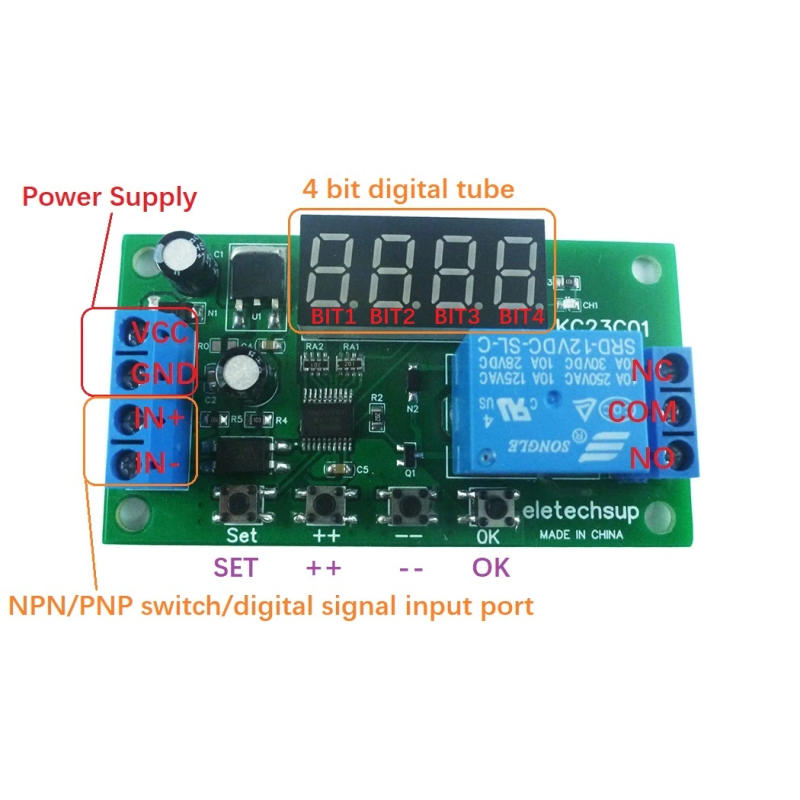
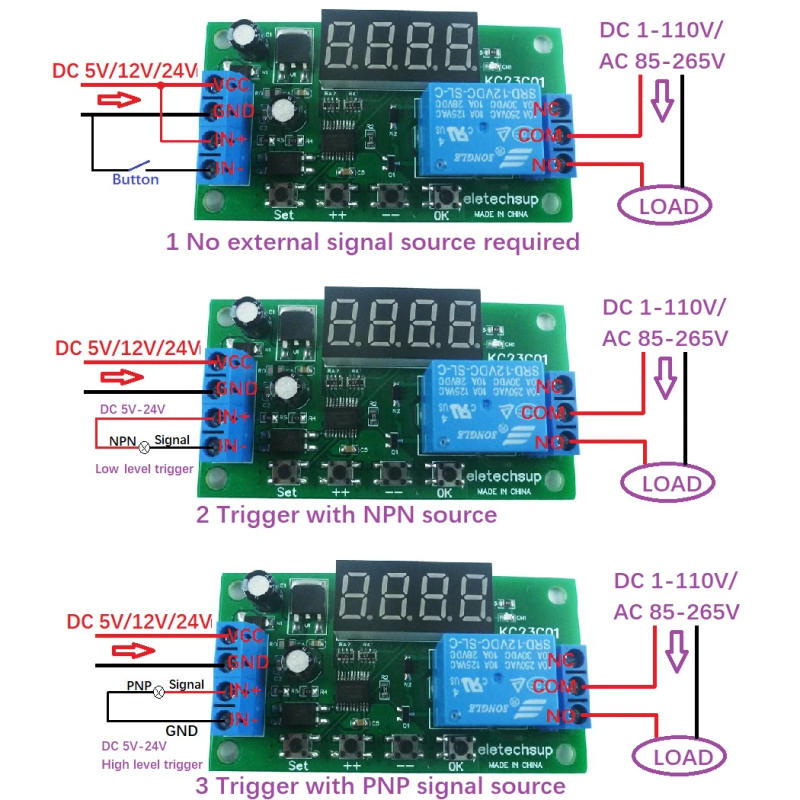
Product Name: DC 5V 12V 24V Multifunction Pulse Counter Trigger Delay Timer Relay Simple PLC Module for Smart Home Package inlcuded: 1 PCS KC23C01 DC 5V/12V/24V 1 channel Counter Cycle Delay ON/OFF Relay Board Product Specifications:Working voltage: DC 12V (DC 5V/ DC24V optional) Working current: Digital tube OFF (Power-Saving Status): Relay OFF 6MA, Relay ON 35MA Digital tube ON (Working Status): Relay OFF 29MA, Relay ON 56MA Three states : Working State, Power-Saving Status, Setting State Input port : Optocoupler isolation input, like minded with NPN/PNP enter (5-24V change signal) Output port : 10A relay NO COM NC three ports Working mode: F00-F05 single-shot pulse management mode, which is a general postpone relaymode F10-F15 pulse counting control mode, depend management relay for enter port Size: 74*40*19 Weight : 29 Relay load: 10A/250VAC; 10A/30VDC Please touch me for detailed directions !!! Product Features: Delay time 0(115), Step 0, Accuracy zero Pulse rely value 0-9999 can be set F00-F05, F10-F15 12 working modes, there are eight working modes to set the number of cycles There are three wiring tricks for the trigger sign enter terminal: 1 No exterior sign supply required 2 Trigger with NPN supply three Trigger with PNP signal supply Setup Instructions: Short press: Press key time is less than 2 seconds; Long press: Press key time more than 2 seconds; Status : Working State, Power-Saving Status, Setting State Working State: In operating state when powered on, F00-F05 mode exhibits last time, F10-F15 mode displays final time and pulse count price Note: When the rest time is higher than four digits, brief press the &;&;OK&;&; button to scroll to reveal the remainder time once Setting Status: Short press the &;&;SET&;&; button to go into the Setting Status, then quick press &;&;SET&;&; to switch parameters, brief press &;&;++&;&;/&;&;--&;&; to switch parameters Short press the &;&;OK&;&; button to save lots of the parameters and exit the environment state Note: After environment the parameters, it ought to be powered on again Query Status: without editing the parameter Setting Status, short press the &;&;SET&;&; button to go into the Query Status, then press &;&;SET&;&; to change parameters, and brief press the &;&;OK&;&; button to exit the Query Status Power-Saving Status: The Working State of the digital tube is grew to become off In this state, the electronic tube does not exhibit and other functions paintings normally Press and maintain the &;&;OK&;&; button for five seconds to enter the Power-Saving Status, and press and preserve the &;&;OK&;&; button again for five seconds to exit the Power-Saving Status Notice: 1 In the Power-Saving Status, you possibly can still enter the surroundings and question state, and it's going to mechanically enter the Power-Saving Status state after 20 seconds of no key operation 2 After the flexibility is turned on again, the Digital Tube exhibits for 20 seconds, the best way to turn off the Digital Tube Factory Setting: Press and hold the &;&;++&;&; and &;&;--&;&; buttons simultaneously for 3 seconds to restore the Factory Settings and turn off the show of the electronic tube Run the default parameters after energy cycle Note: After surroundings the parameters, it needs to be powered on again Exception handling: 1 If you come upon inexplicable problems, please strength on again (this is because there's no restart after atmosphere parameters) 2 If the issue still cannot be solved after powering on again, please press and hold the &;&;++&;&; and &;&;--&;&; buttons simultaneously for three seconds to revive the manufacturing unit settings then power on again Please contact me for detailed directions !!!
Atsauksmes
0 people rated this product

DC 5V 12V 24V Multifunction Pulse Counter Trigger Delay Timer Relay Simple PLC Module for Smart Home


Bezmaksas piegāde un atgriešana
 QWQER Express,
 USPS,
USPS, DHL
DHL
Shopping security
- Safe payment options
- Secure privacy
- Secure logistics
- Purchase protection