





Description
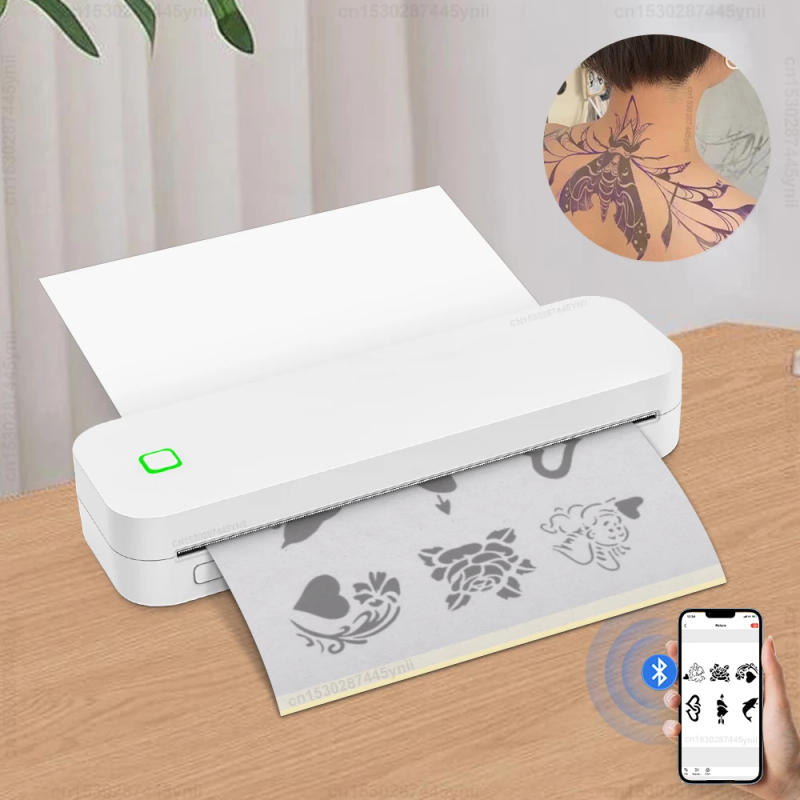
Labelwell A4 Thermal Printer Portable Inkless USB Bluetooth Wireless Mobile Travel Printer for IOS Android PC PDF Document Photo Printing A4 Tattoo Stencil Printer Product Information Product Model : A4 Inkless Thermal Printer D210 ( Tattoo Stencil Printer) Print Method : Thermal Max Resolution: 203dpi Print Type : Thermal Line Printing Print Speed : 12mm/s 1Roll Paper Size in printer : 210mm*Φ30mm , 8m Support eleven languages : Simplified Chinese, Traditional ChineseEnglish, German, Italian, Japanese, French, , Spanish, Korean, Russian, Arabic Connect : Bluetooth / USBConnected APP : Marklife Battery : 2600mAh Lithium Battery Recharge : Type-C Paper roll outer diameter (Max) : 30mm Maximum loading width (including backing paper) :210mm Supported paper roll types : Continuous paper, Fanfold paper Printing Color : Only Black Printing Packing : 1*Printer+ 1Roll Paper ( Size: 210mm*Φ30mm, 8m) Features: 1 Compact and space saving design: Portable printer design is appropriate for your bag or briefcase, convenient to carry, and extremely appropriate for long-distance commuting Its light-weight design makes it very appropriate for mobile printing needs, whether or not you're traveling at work, business, office, home, car, or college 2 Ink free printing: Small printers use thermal sensitive know-how - no ink, toner, or ribbon required, getting rid of ink related blockage and cleansing disorders You only need to update the thermal paper 3 Powerful compatibility: Print PDF, Word documents, images, and websites instantly out of your telephone anytime, anywhere You can also use a USB records cable to connect to the pc for printing 4 High quality printing: Thermal printers provide ultimate printing clarity, making certain excessive quality, clarity, deep color, smoothness, and quick processing (black and white printing), making printing worry free 5 High quality materials: Thermal printers are made from sturdy and long-lasting wonderful materials, guaranteeing consistent performance and fantastic printing over time Usage Steps: 1 Insert Paper Roll in A4 Thermal Printer 2 Open the Google App Store or Apple App Store, input "Marklife" and seek for the obtain app Confirm to turn on Bluetooth on your phone, connect with the printer throughout the app, open the app, and click "Not Connected" within the higher left nook of the app, Search for printers and fasten them in line with activates 3 Edit File & Print Product Details


Review
0 people rated this product

Inkless A4 Thermal Printer Portable Wireless Bluetooth Tattoo Stencil Printer A4 Paper PDF Excel Document Picture Print Machine


Free shipping & returns
 QWQER Express,
 USPS,
USPS, DHL
DHL
Shopping security
- Safe payment options
- Secure privacy
- Secure logistics
- Purchase protection