


Description
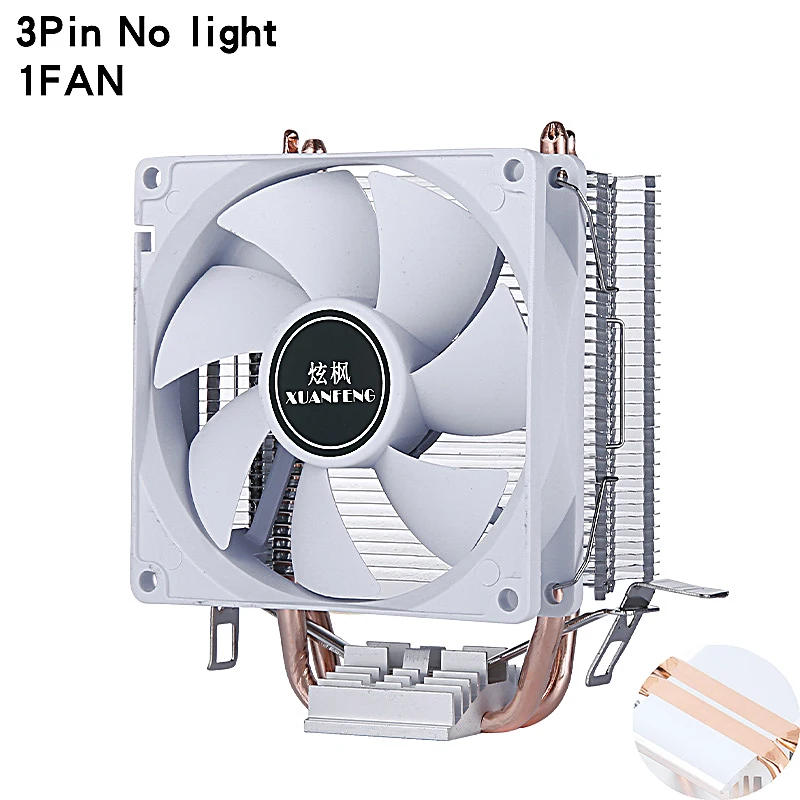
Product brand: XUANFENG Product name: CPU cooler fan 2 Heat pipes Product size: 90 (length) * 60 (width) * a hundred thirty five (height) mm four Heat pipes Product size: ninety (length) * seventy three (width) * 135 (height) mm 6 Heat pipes Product size: ninety (length) * seventy three (width) * 135 (height) mm Fan size: 90 * 90 * 25mm Heat pipe specification: 6mm * 2/4/6 pieces 3-wire speed: 2000 RPM ± 10% 4-wire speed: 800-2000 RPM ± 10% 3-wire current: 0 without lamp, 0 with lamp ± 10% 4-wire current: zero without lamp, zero with lamp ± 10% 3-wire power: 2W without light, three with light ± 10% 4-wire power: 1W without light, 2 with mild ± 10% Noise control: 25dBA Air volume: 60CFM (maximum) (The above data is for one fan If there are multiple fans (air volume, noise, current, power), the info will increase) Fan bearings: hydraulic bearings Working voltage: DC 12V Process materials: copper and aluminum Working life: 50000 hours Fan interface: 3Pin (3-wire fixed speed)/4Pin (4-wire temperature control) Fan twine length: 30CM ± 10% Packaging method: boxed Note: Due to guide measurement, diverse dimension tricks and tools, there may be slight dimensional deviations Due to variations in lighting, angle, and display, images may not mirror the particular shade of the item The following is an set up academic video for this product, hoping to be useful to you The products put in within the video are for reference only, however the set up system is the same Socket: For Intel: LGA:775/1150/1151/1155/1156/1200/1700/1356/1366 (i3 i5 i7) For Intel: LGA:2011 x79 x99 E5 x299 2099 2066 E3 For AMD: AM4/AM2+/AM2/AM3+/FM1/FM2/FM2+ (For AMD, the original bracket on the motherboard needs to be retained, simply attach the cooler) You can desire one of the following two forms of brackets that's appropriate for putting in the motherboard Regarding the selection of interface types 3Pin or 4Pin interfaces are common and might be put in with out hectic about interface kinds Fixed velocity type: 3-pin fan, fixed speed, extensive air volume, good warmth dissipation, yet there may be comparatively slight wind noise Temperature control board: The 4Pin fan will intelligently modify the fan velocity in keeping with the current CPU temperature, which is energy-saving and silent Extend provider life! (The motherboard must support and allow PWM velocity regulation function, which is basically available on all motherboards) The following is a tutorial on installing a CPU cooling fan The product in the picture may be assorted from the one you purchased, but the set up formula is an identical 1 As proven within the figure, suitable for installation: LGA: 2011, 2066, 2099, X79, X99, X299, E3, E5, and so on 2 As proven in the figure, position the bracket in the hole at the motherboard, take out the screw, and tighten it 3 As proven within the figure, total the screw tightening four As shown in the figure, open the thermal conductive silicone grease and lightly observe it to the skin of the CPU five As shown within the figure, eradicate the protective film on the bottom of the radiator before set up 6 As proven within the figure, align the cardboard slot on the bracket and press the buckle 7 As shown within the figure, align the cardboard slot at the bracket and press the buckle eight As shown in the figure, there's no deserve to worry about different interfaces for CPUFAN 3Pin/4Pin universal 9 As proven within the figure, the blue arrow represents the air inlet, and the red arrow represents the air outlet 10 As proven within the figure, the set up is finished The following is an instructional on putting in a CPU cooling fan The product within the photograph may be varied from the one you purchased, however the installation formula is the same 1 As proven in the figure, compatible for installation: LGA: 775, 1150, 1151, 1155, 1156, 1200, 1700, 1356, 1366 (i3, i5, i7), etc 2 As shown within the figure, place the bracket within the hole at the motherboard, regulate the tools compatible for the motherboard, and align it Take out the clear adhesive nails and place them in the appropriate equipment for the motherboard 3 As shown in the figure, place the black wedge at the inner ring of the transparent adhesive nail and press calmly 4 As proven in the figure, open the thermal conductive silicone grease and calmly practice it to the surface of the CPU five As shown within the figure, get rid of the protecting film on the bottom of the radiator before set up 6 As proven within the figure, align the card slot at the bracket and press the buckle 7 As shown within the figure, align the cardboard slot at the bracket and press the buckle eight As proven within the figure, there is not any need to worry about diversified interfaces for CPUFAN 3Pin/4Pin common nine As proven in the figure, the blue arrow represents the air inlet, and the purple arrow represents the air outlet 10 As proven within the figure, the installation is done The following is an instructional on putting in a CPU cooling fan The product in the photo may be diverse from the one you purchased, but the set up formula is a similar 1 shown within the figure, the AMD substrate can be directly put in using the bracket of the original substrate with out the desire for the accessories we provide AMD installation: For AMD, you need to hold the original bracket on the motherboard 2 As shown within the figure, open the thermal conductive silicone grease and lightly practice it to the outside of the CPU 3 As shown in the figure, eradicate the protective film on the backside of the radiator earlier than installation four As shown within the figure, align the card slot at the bracket and press the buckle five As proven within the figure, align the card slot at the bracket and press the buckle 6 As shown in the figure, there's no need to fear about diversified interfaces for the CPUFAN interface 3Pin/4Pin common 7 As shown in the figure, the blue arrow represents the air inlet, and the pink arrow represents the air outlet eight As shown in the figure, the set up is completed 2 Heat pipe Cooler 1Fan 4 Heat pipe Cooler 1Fan 6 Heat pipe Cooler 1Fan


Review
0 people rated this product

PC Air-Cooled Radiator CPU Cooling Fan 2/4/6 Heat Pipe Cooler Installing LGA2011 x79 x99 E5 2066 2099 115x 1200 1700 i5 i7 AMD


Free shipping & returns
 QWQER Express,
 USPS,
USPS, DHL
DHL
Shopping security
- Safe payment options
- Secure privacy
- Secure logistics
- Purchase protection