


Opisy
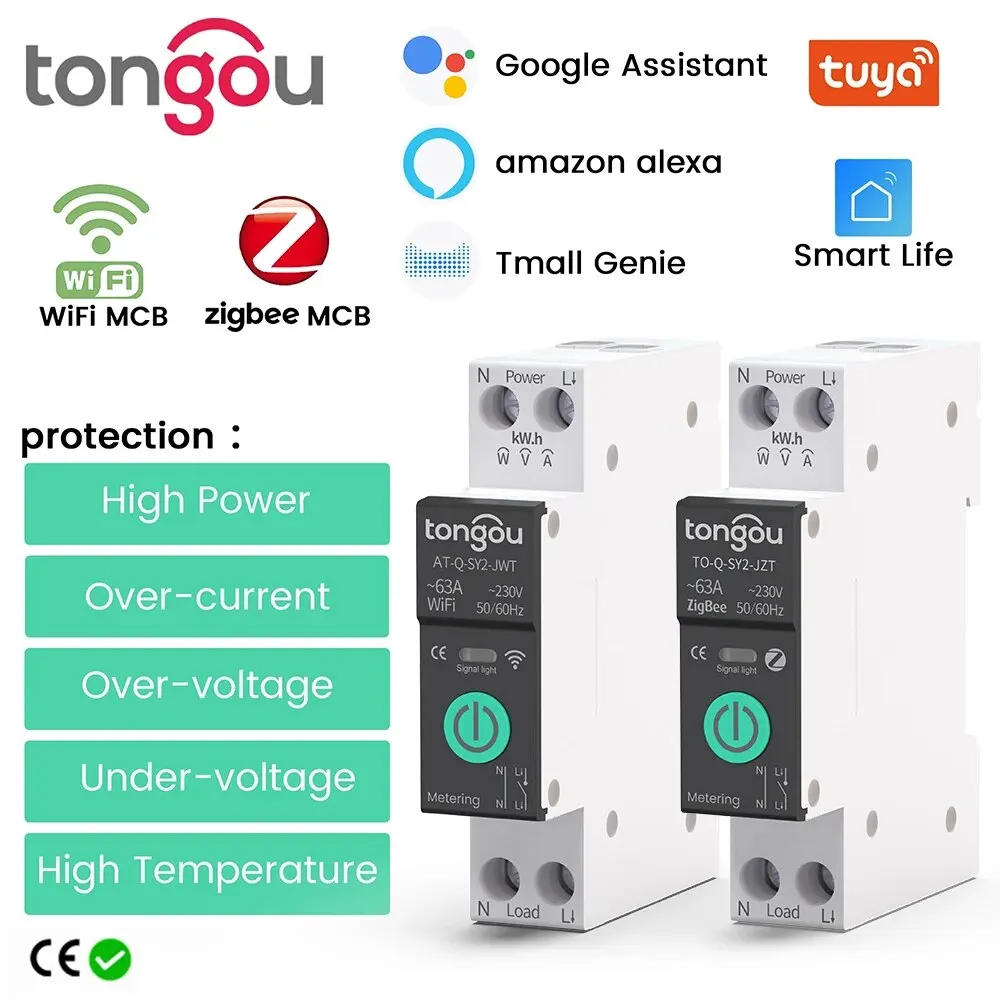
• Over-under defense :Protects against overcurrent and undervoltage, guaranteeing secure and stable energy supply • Power defense :Provides defense against strength surges and fluctuations, stopping injury to electric appliances • Temperature defense :Operates efficiently within a wide temperature range, making certain dependable performance even in harsh environments • Remote management swap :Allows for straightforward and convenient control of the circuit breaker from a distance, making it simpler to manage your home&;s electrical components TO-Q-SY2 Din Rail Smart Switch pairing operation and performance surroundings WiFi 1-63A adjustable Function Feature: This merchandise is a WiFi MCB Circuit Breaker Over-current Protection and Under-voltage Protection and Over-under-voltage Protection, The rated current is adjustable in APP, 1-63A Remote control at anytime from wherever by TUYA APP / Smart Life APP Smart Life app on mobile ,no distance limit Schedule / Timing, countdown, cycle timing Voice control by Amazon Alexa echo dot / Google assistant Parameter: Working voltage : AC90-280V, 50 / 60Hz Wireless kind : Wi-Fi 2 Support components : Android \ iOS Rate Current : (1-63A)adjustable Over-voltage defense : 220-265V Unde-voltage defense : 76-240V Temperature protection: 40-100? Over-Power protection : 1-26KW WIFI DIN RAIL SWITCH MODEL OPEN ANEW ERA OF INTELLIGENCE Into Smart With Your DIY Idea 1 Remote management / 2 Timing / three Temperature protection 4 Over-current defense 5 Over-voltage and under-voltage prontection 6 Real-time tracking ofelectricity intake New updates Of products Setting Alarm Setting (TO-Q-SY2) Functional protection , the alarm fuction is automatically became on after environment the theshold , and the protection trpping change can be grew to become on or off Safe and safe desire Protection opposed to over-temperature and over-load over-voltage and under-voltage METERING FUNCTIONKWH VOLTAGE , CURRENT Into Smart With Your DIY Idea View load current , voltage , energy in real time Record (year , month , day , hour) electicity consumption in several time durations TIME ON / OFF Setup the turn on / off time by way of the APP Three Timing Modes (Timing Mode / Countdown Mode / Loop Timing) Timing Mode Before going home from get off paintings 18:30 Turn at the lighting Countdown Mode after falling asleep flip off the lighting fixtures after 10 minutes Loop Timing Before waking up / after going to paintings 06:00 Turn on the lights / 08:00 Lights off "Hi Google,turn off the light" "Okay" Voice Controls Voice linkage Compatible with Amazon Alexa Google Home What do you want to control ? simply say it 35MM STANDARDIZED MOUNTING RAILSEASY INSTALLATION Tight clips snap the rails to use a more secure and worry-free Product Details Benefit Your Life Touch manage Sleek design for more well-off operation Flame retardant material High temperature resistance and flame retardant , efficiently upgrade the security of use Single channel wiring Tunnel-type wiring port for safer wiring Positioning clip Press to open easily , Simple installation Network Pairing Benefit Your Life 1 To join the twine from the uppper of the WiFi DINRail Switch , the reside twine hook up with the Lpole , and impartial wire hook up with the N pole , please be sure that the wiring is correct and robust WiFi sign 2 Turn on the Blue enamel and WiFi of the cellphone , open the APP,and then long press the"power"button,wait for approximately 5-10 secaonds , the LED indicator will flash blue mild slowly three Waiting for some time after graphics is displayer the app,or click on the"+"in the upper righe corner , then desire the"Add Device"button to waitdaiscovering devi four Enter the wifi account password and click next step,wait for the swap to connect the netwoek 5 change is hooked up to the network 6 After the profitable connection,the LED indicator may be changed from crimson slow flashing to purple regular mild Zigbee1-63A adjustable Function Notice : A word on Zigbee gateway adaptability 1、Wired zigbee gateway: please be certain that the firmware version ≥ 1(WIFI)/1(Zigbee) 2, WIFI + Zigbee wi-fi gateway: please ensure that the firmware version ≥ 1 (WIFI) / 1 (Zigbee) 3, Mini multimode gateway (the commonest edition for domestic use): please be certain that the firmware version ≥ 1 (WIFI) / 2 (Zigbee) 4,、WIFI + Zigbee intelligent dual-link gateway: please be sure that the firmware version ≥ 1 (WIFI) / 1 (Zigbee) 5、Household multi-mode-function gateway (usually with audible and visible alarm function) and Smart Wired Gateway Pro (usually known as Matter Gateway), they don't assist temperature and latest regulation modules Zigbee edition requires a zigbee hub/Gateway for remote control This product adopts the rising zigbee expertise and professional manufacturing process Wiring : Power should enter from the top and ought to be a stay line + neutral (L+N) Feature: Remote management at anytime from anywhere by means of TUYA APP / Smart Life APP Schedule / Timing, countdown, cycle timing Voice management by means of Amazon Alexa echo dot / Google assistant Parameter: This merchandise is a ZigBee MCB Circuit Breaker Over-current Protection and Under-voltage Protection and Over-under-voltage Protection, The rated recent is adjustable in APP, 1-63A Working voltage : AC90-280V, 50 / 60Hz Support method : Android \ iOS Rate Current : (1-63A) adjustable Over-voltage protection : 220-265V Unde-voltage protection : 76-240V Temperature protection: 40-100? Over-Power defense : 1-26KW ZIGBEE DIN RAIL SWITCH MODEL New product updates A Whole Linkage of Your Smart Connected Zigbee devices and other WiFi devices within the App is now forming an entire house linkage forthe sensible hub Product Details Benefit Your Life Touch handle Sleek design for more well-off operation Flame retardant material High temperature resistance and flame retardant , efficiently upgrade the safety of use Single channel wiring Tunnel-type wiring port for safer wiring Positioning clip Press to open easily , Simple set up Network Pairing Benefit Your Life 1 To join the wire from the uppper of the WiFi DINRail Switch , the reside twine connect to the Lpole , and neutral cord hook up with the N pole , please be sure that the wiring is true and strong WiFi signal 2 Turn at the Blue enamel and WiFi of the mobile phone , open the APP,and then lengthy press the"power"button,wait for about 5-10 secaonds , the LED indicator will flash blue light slowly 3 Waiting for some time after graphics is displayer the app,or click on the"+"in the upper righe corner , then favor the"Add Device"button to waitdaiscovering devi 4 Enter the wifi account password and click next step,wait for the swap to attach the netwoek 5 switch is connected to the community 6 After the successful connection,the LED indicator might be changed from crimson gradual flashing to crimson steady light


Recenzja
0 people rated this product

TUYA WiFi/ZigBee MCB Smart Circuit Breaker Over Current Under Voltage Protection Power Metering 1-63A Remote Control Switch

Wysyłka i zwroty
 QWQER Express,
 USPS,
USPS, DHL
DHL
Shopping security
- Safe payment options
- Secure privacy
- Secure logistics
- Purchase protection